
I will list the commands and each argument the command should have or sub commands it should have.
I'm using DiscordJS API wrapper docs as examples since they're a complete and
well documented wrapper, but you can use any lib listed on libs.advaith.io that
are in an up to date version and have most features available.
Necessary perms: Admin or Arcanum (
<@&1271233959254294548>)
The bot can send a message to the user when he's banned saying
the Appeal Message if there's one and also the Duration of the ban.
The bot send a message on an admin channel saying that mod/admin X banned user Y
with all the data related to the ban command in it.
- User: Which user should be banned
- Format:
<user> - Required:
true
- Format:
- Rule: Which rule the user bypassed, the
nameshould be
the rule number + the small description in bold that we have at #Rules on discord- Format:
<choice> - Required:
true
- Format:
- Reason: Why the user got banned, this message will be sent in a discord log
channel that admins have access and/or a dashboard for the bot.- Format:
<string> - Required:
false - Example:
User died of ligma
- Format:
- Duration: How long the user should be banned
- Format:
<int><time_format> - Required:
false - Default: assume permanent ban.
- Format:
- Delete Messages: Number of days that the bot should delete messages from the user.
It would be cool to have at least the last 10 or so messages if not
all the messages within the specified time registered in some log, be it a
discord channel logging it or a bot dashboard.- Format:
<int> - Required:
false - Default: 1 (thus deleting the last 24h)
- Format:
- Appeal Message: Message that the bot will send to the user in case he's allowed
to appeal.Appeals could be handled in many ways, you can have a
hello@boot.dev
mail to appeal. You can use a space in the dashboard for it.You can make the bot create a discord channel where only Admins and Arcanum
can see with an Appeal ID in which messages that the banned user send on the
chat with the bot is sent to that discord channel through embeds and webhooks
and the replies from Admins/Arcanum is also sent to the user through embeds
in his DM.If you dont want every message from the DM's to be sent nor every
message from the appeal channel to be sent we could have a/appealcommand
where in DM's it would automatically find the ID that you're appealing to
and in the discord chat it will discover which appeal based on the channel
name.- Format:
<string> - Required:
false - Example:
You broke rule X Y times and thus you're being banned
- Format:
Necessary perms: Admin or Arcanum (
<@&1271233959254294548>)
Works the same as /ban but without the Duration and instead of Appeal
the user can go back instantly as long as he don't missbehave.
Necessary perms: Admin or Arcanum (
<@&1271233959254294548>)
- Duration: How much time in seconds should the channel be slowmoded.
- Format:
<int>
Optionaly instead of time in seconds it could be a
<choice>list with
time options like when you do it through discord GUI.- Required:
true
- Format:
- Channel: Which channel should get slowmode.
- Format:
<channel> - Required:
false - Default: channel that the command was used
- Format:
Necessary perms: Admin or Arcanum (
<@&1271233959254294548>)
- Channel: Which channel should be locked
- Format:
<channel> - Required:
false - Default: channel that the command was used
- Format:
- Duration: How much time should the channel be locked
- Format:
<int><time_format> - Required:
false - Default: assume permanent lock until /unlock.
- Format:
- Message: Message that the bot will send when locking the channel.
- Format:
<string> - Required:
false - Default:
This channel was locked by an admin until <discord_timestamp:R>
Check discord timestamp to see how to use it.
- Format:
Necessary perms: Admin or Arcanum (
<@&1271233959254294548>)
If the command is used in a channel that is already unlocked send the user who
tried to use the command an ephemeral reply saying that the channel
is already unlocked.
- Channel: Which channel should be unlocked
- Format:
<channel> - Required:
false - Default: channel that the command was used
- Format:
FAQ should also be increased as said by Kei and Miranda.
Optionally if you want faq and rule can be merged
in a/warncommand withfaqandruleas subcommands as stated on the API.
Maybe some other name that isn'twarn, cuzwarn faqsounds too harsh imo.
The reason I'm suggesting a merge is to address the issue Snorlax raised
about having a differentiation between a light reminder and heavier warn.
That could also be solved by simply changing the color of the embed left line
depending on the severity of the message.
- User: Which user should be pinged with the FAQ info
- Format:
<user> - Required:
true
- Format:
- FAQ: Which FAQ the user asked about, the
nameshould be
the FAQ number + the small description in bold that we have at #FAQ on discord- Format:
<choice>
If in the future we have more than 25 FAQ options we could instead change
from a<choice>to an .- Required:
true
- Format:
- User: Which user should be pinged with the FAQ info
- Format:
<user> - Required:
true
- Format:
- Rule: Which rule the user bypassed, the
nameshould be
the rule number + the small description in bold that we have at #Rules on discord- Format:
<choice> - Required:
true
- Format:
Necessary perms: Admin, Arcanum (
<@&1271233959254294548>) or OP
If the command is used outside a help thread channel send an ephemeral message
to the user saying that this command is only available inside a thread.
If the command is used inside a help thread the command should close the thread
and add the solved tag to it.
Putting both together here at the and so they're listed as available commands
but they woudn't change in this upgrade.
A discord choice as defined on the API.
You can have up to a 100 characters name to describe it,
and a value that the bot will read when you define it.
Think of it like a kind of ENUM.
You have a limit of 25 choices per option in the command.
- Example:
- name:
0 . Do NOT advertise - value:
rule 0 - behaviour: By selecting the "name" that says
0. Do NOT advertise
the bot get the valuerule 0as the data input for thechoice.
- name:
An internal way to define time for usage in many commands.
Time Format can be: minute, hour, day, week, month, year
Example: 30m, 48h, 3d, 2w, 6m, 1y
An equivalent of SlashCommandUserOption in your Discord API Wrapper of preference.
An equivalent of SlashCommandChannelOption in your Discord API Wrapper of preference.
A discord timestamp like the ones you can generate on a timestamp generator website.
Syntax is <t:UNIX_TIME:FORMAT>, format options are in the table below.
| Format | Description | Preview |
|---|---|---|
| F | Long Date/Time | Thursday, July 24, 2025 at 10:12 PM |
| f | Short Date/Time | July 24, 2025 at 10:12 PM |
| D | Long Date | July 24, 2025 |
| d | Short Date | 7/24/25 |
| T | Long Time | 10:12:00 PM |
| t | Short Time | 10:12 PM |
| R | Relative Time | 55 seconds ago |
An ephemeral message is a message that is only visible to the user who invoked
the Interaction as stated on the API.
An autocomplete as stated by the API allow your application to
dynamically return option suggestions to a user as they type. Which is a good
alternative to choices if you need more than 25 options.
When I talk about a dashboard what I mean is to have something similar to
YAGPDB Dashboard where you can see logs like this
but more importantly log deleted messages from banned users like you see bellow.
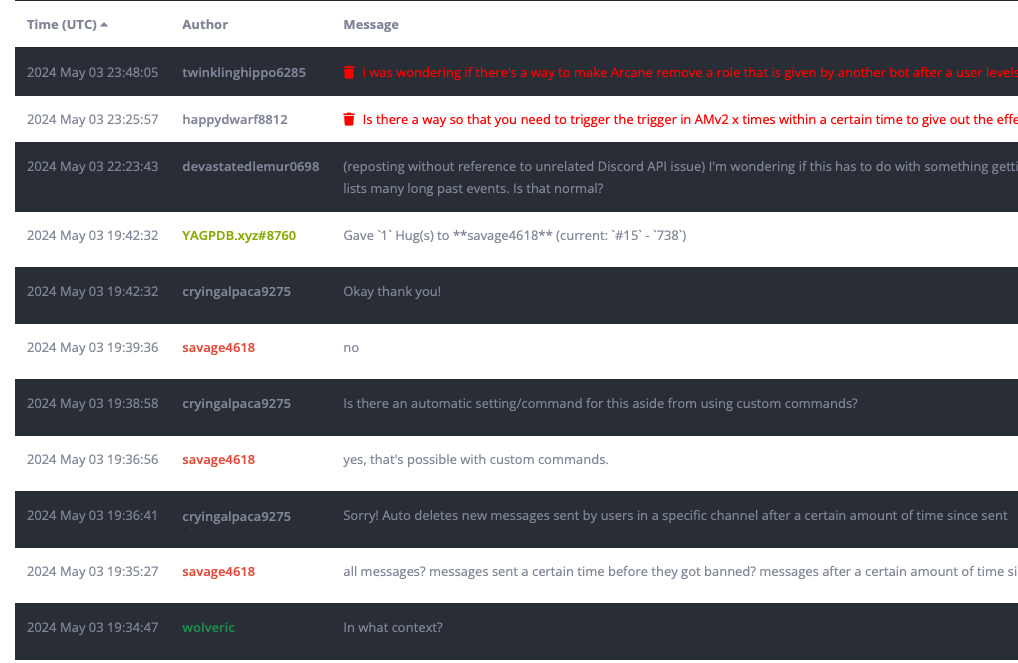
In the future the dashboard could also be upgraded to have more features but
for now having a log of deleted messages of banned users would be amazing for
when someone who was banned appeal his ban. Optionally that could be in a discord
channel but that makes it harder to scale.