
-
-
Save jakubfijalkowski/0771bfbd26ce68456d3e to your computer and use it in GitHub Desktop.
| using System.ComponentModel; | |
| using System.Globalization; | |
| using System.Resources; | |
| using System.Windows.Data; | |
| public class TranslationSource | |
| : INotifyPropertyChanged | |
| { | |
| private static readonly TranslationSource instance = new TranslationSource(); | |
| public static TranslationSource Instance | |
| { | |
| get { return instance; } | |
| } | |
| private readonly ResourceManager resManager = Properties.Resources.ResourceManager; | |
| private CultureInfo currentCulture = null; | |
| public string this[string key] | |
| { | |
| get { return this.resManager.GetString(key, this.currentCulture); } | |
| } | |
| public CultureInfo CurrentCulture | |
| { | |
| get { return this.currentCulture; } | |
| set | |
| { | |
| if (this.currentCulture != value) | |
| { | |
| this.currentCulture = value; | |
| var @event = this.PropertyChanged; | |
| if (@event != null) | |
| { | |
| @event.Invoke(this, new PropertyChangedEventArgs(string.Empty)); | |
| } | |
| } | |
| } | |
| } | |
| public event PropertyChangedEventHandler PropertyChanged; | |
| } | |
| public class LocExtension | |
| : Binding | |
| { | |
| public LocExtension(string name) | |
| : base("[" + name + "]") | |
| { | |
| this.Mode = BindingMode.OneWay; | |
| this.Source = TranslationSource.Instance; | |
| } | |
| } |


Very nice work indeed. This is in my opinion the most elegant and straightforward approach for multilanguage WPF applications.
I've used this a lot in the recent months and the only thing I was missing was the ability to easily concatenate multiple localized resources into a single string. I was looking into the WPF multibinding feature, but eventually realized this is easily implemented with a slight change in your code.
Usage:
<Label Content="{l:Loc Add_Customer}"/>
...this gives localized resources for keys "Add" and "Customer" separated by a space => "Add Customer" for the default locale.
Code:
private const char KeySeparator = '_';

public string this[string key]
        {
            get
            {
                if (key.IndexOf(KeySeparator)==-1)
                {
                    var res = ResourceManager?.GetString(key, _currentCulture);
                    return !string.IsNullOrWhiteSpace(res) ? res : $"[{key}]";
                }
                else
                {
                    var keys = key.Split(KeySeparator);
                    var results = new List<string>();
                    foreach (var k in keys)
                    {
                        var res = ResourceManager?.GetString(k, _currentCulture);
                        results.Add(!string.IsNullOrWhiteSpace(res) ? res : $"[{k}]");
                    }
                    return string.Join(" ", results);
                }
            }
        }

works perfectly - super helpful! thanks a lot!

Brilliant solution. Thanks a lot.

Very, very, very interesting! This showed me a complete different angle of view how to work with bindings! Thanks! 👍

That looks nice. Do you have any copyright/licensing on this code?

Wow, I didn't expect that much feedback here (and GitHub decided not to notify me - damn you, settings!). It's awesome that you find this useful. Thanks a lot!
@ghostelet - feel free to use it in whatever form you like (w/o copyright notice). You may treat it as public domain.

This is an excellent solution!
Thank you for this and for all your help making a version that works with multiple resource managers

Hi,
I am new to c# programming. I am trying to create a multi language app. I can't seem to get it to work. When i copy and paste the codes to project and created resources files. I keep getting error on this line
'private readonly ResourceManager resManager = Properties.Resources.ResourceManager;'
saying the name properties does not exist in current context.
as well
when I try to set the text on my textblook like
' < TextBlock Text="{x:Static ns:Loc t1}" Width="290" / > '
it will result in: Cannot find the member "Loc t1" on the target type.
Can someone help my learn please? thank you

Great solution!

tnx❤

one of the best solution i have ever seen in regarding to localization. BRILLIANT peace of CODE ! Thank You
it can be used not only for localisation :)

PS. and i saw a lot of code ...:)
@KaiserWerk: It doesn't really matter where it is, as long as you use correct ResourceManager to get the strings (provided that it is being generated, i.e. the file has correct type in MSBuild). The common location is to put it in Resources directory.

@KaiserWerk: It doesn't really matter where it is, as long as you use correct
ResourceManagerto get the strings (provided that it is being generated, i.e. the file has correct type in MSBuild). The common location is to put it inResourcesdirectory.
I already got it working, google helped. Thanks a lot to you, too!
Unfortunately this method does not support binding to property,I found a better code that also supports binding
You can use the Handycontrols package to use it
github.com/ghost1372/handycontrols

Works like a charm!! Thanks man.
everything (property binding) works but it is (da vinci code = to run You must replace one element : ) ) ...
VIEW:
xmlns:local="clr-namespace:MyNamespace.UserInterface.Common.Localization"<TextBlock Text="{local:LocK name}"/>- the Resource files in the code above default are placed in the PROPERTIES folder(but You can adjust the ResourceManager
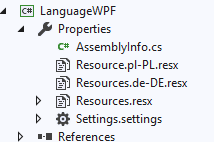
):

Since I had a bit of trouble figuring out how to actually use the class, heres examples to help others:
XAML:
xmlns:local="clr-namespace:MyNamespace.LocalizationNamespace"
The namespace for xaml is whatever you set it in the class.
Usage:
"{local:Loc <PropertyName>}"
C#:
Properties.Resources.ResourceManager.GetString(nameof(Properties.Resources.<PROPERTYNAME>), Localization.TranslationSource.Instance.CurrentCulture);
And for switching to the actual culture:
C#:
Localization.TranslationSource.Instance.CurrentCulture = CultureInfo.GetCultureInfo("en-example");

@jakubfijalkowski, thanks for your code. Is there a way to allow something like this?
{ns:Loc {Binding ViewModelProperty}}
@lszczygielek If my memory is not mistaken, that is possible with some changes to the code (i.e. you need to handle the binding somewhat yourself). Unfortunately, I haven't touched it in years and won't be able to help what needs to be changed.

How come, no one ever posts the actual source code?
I realize that some people are able to read the class, and implement it. But some still require assistance, as clearly demonstrated in every comment section, on this topic.
How come, no one ever posts the actual source code? I realize that some people are able to read the class, and implement it. But some still require assistance, as clearly demonstrated in every comment section, on this topic.
Years ago I desperately needed this feature and as a result I implemented the most complete version of it in the legendary HandyControls.
and docs:
https://ghost1372.github.io/handycontrol/persianToolkit/dynamicLanguage/
Thanks!!! This is very useful and work out of the box.