You signed in with another tab or window. Reload to refresh your session.You signed out in another tab or window. Reload to refresh your session.You switched accounts on another tab or window. Reload to refresh your session.Dismiss alert
SSH into GCP VMs via IAP using standard SSH config — ProxyCommand setup and the username trap
SSH into GCP VMs via IAP Using Standard SSH Config
If your GCP VMs don't have external IPs (or you use IAP for security), gcloud compute ssh --tunnel-through-iap works — but it's verbose. You can't use it with scp, rsync, Ansible, or VSCode Remote-SSH easily.
This guide shows how to set up ~/.ssh/config so you can just run:
This file contains hidden or bidirectional Unicode text that may be interpreted or compiled differently than what appears below. To review, open the file in an editor that reveals hidden Unicode characters.
Learn more about bidirectional Unicode characters
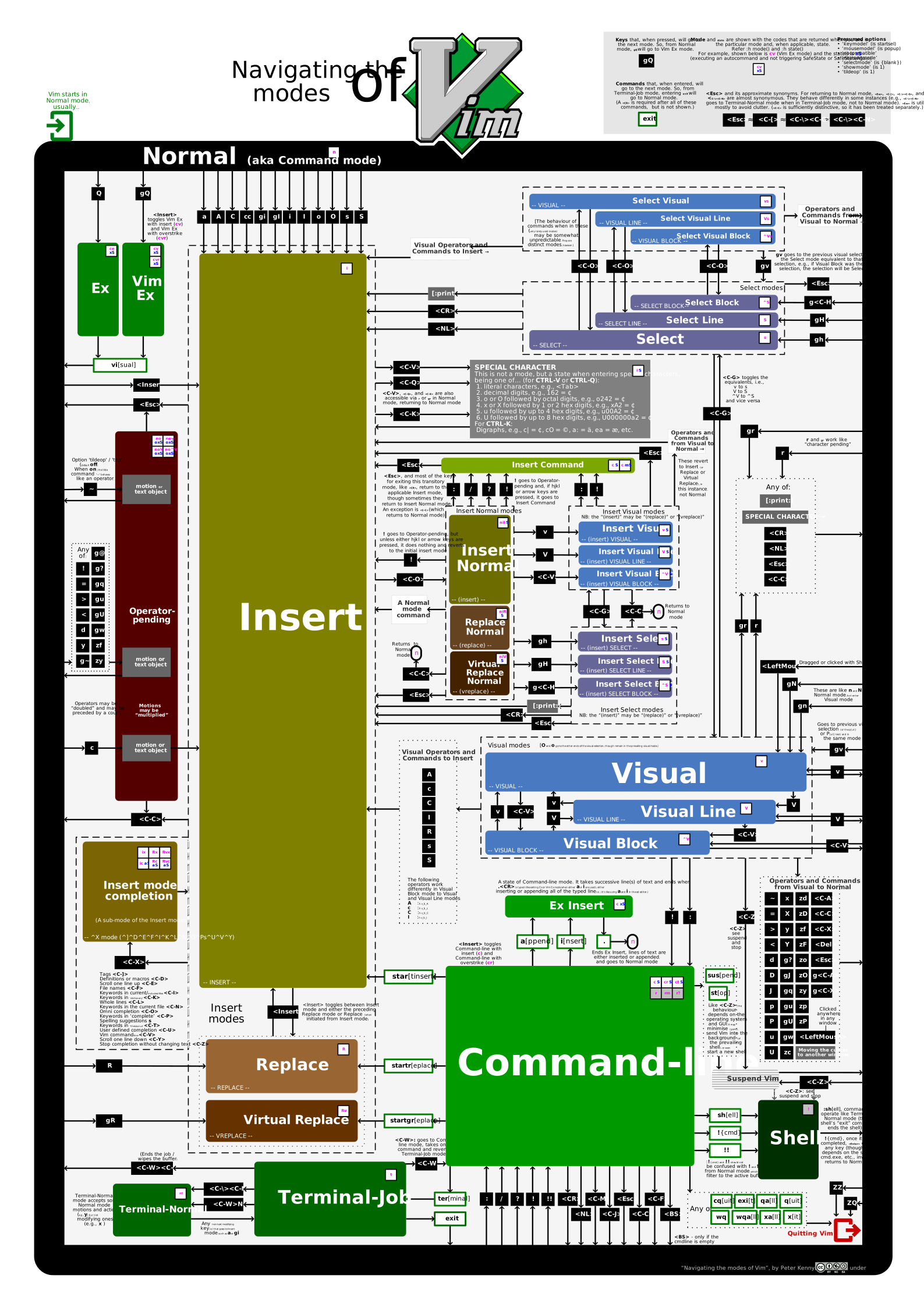
This diagram illustrates navigating through Vim’s modes. It was built factoring Vim 9 (i.e., all its modes, including up to two new modes, cr and cvr, in November 2023). Information about the state() and 'showmode' is provided too.
SVG version
Some features are only available in the SVG version.
It is not provided directly from within this gist’s files because SVGs do not always play nicely in GitHub (particularly, refusing to display embedded fonts).
The SVG version includes hover text help, which shows pertinent information about the underlying key, command, mode, etc.
This file contains hidden or bidirectional Unicode text that may be interpreted or compiled differently than what appears below. To review, open the file in an editor that reveals hidden Unicode characters.
Learn more about bidirectional Unicode characters
This file contains hidden or bidirectional Unicode text that may be interpreted or compiled differently than what appears below. To review, open the file in an editor that reveals hidden Unicode characters.
Learn more about bidirectional Unicode characters
This file contains hidden or bidirectional Unicode text that may be interpreted or compiled differently than what appears below. To review, open the file in an editor that reveals hidden Unicode characters.
Learn more about bidirectional Unicode characters
Connect host and VM when using MACVTAP instead of TAP interfaces
Connect host and VM when using a MACVTAP interface
NB: The following is only of interest if you want to share the host network with your virtual machine. The most common way this gets implemented is by setting up a bridge which includes the physical interface. Using a [MACVTAP] inerface is suposed to be more efficient, since it avoids the additional bridge in the network setup.
In this gist, we extend the information provided in the documenation on linux virtual interfaces.
In the following, we assume you host interface is eth0. IP addresses used:
I faced bandwidth issues between a WG Peer and a WG server. Download bandwidth when downloading from WG Server to WG peer was reduced significantly and upload bandwidth was practically non existent.
I found a few reddit posts that said that we need to choose the right MTU. So I wrote a script to find an optimal MTU.
Ideally I would have liked to have run all possible MTU configurations for both WG Server and WG Peer but for simplicity I choose to fix the WG Server to the original 1420 MTU and tried all MTUs from 1280 to 1500 for the WG Peer.
Testing
On WG server, I started an iperf3 server
On WG peer, I wrote a script that does the following: